1. build.gradle 에 의존성 추가
implementation 'org.springframework.boot:spring-boot-starter-validation'
2.컨트롤러 메소드의 검하고자 하는 파라미터 앞에 @Validated 붙여주기

3. 검사하고자 하는 dto에 @field: NotNull 붙여주기
주의할 점
import 할 때
jakarta.validation.constraints.NotNull위의 경로로 해줘야함
org.jetbrains.annotations이 경로도 뜨는데 이걸로 하니 어째선가 안됨,,
@field: 의 경우 코틀린일 때만 필수

4. @RestControllerAdvice 생성
@RequestBody에서 발생한 오류는 MethodArgumentNotValidException로 처리됨
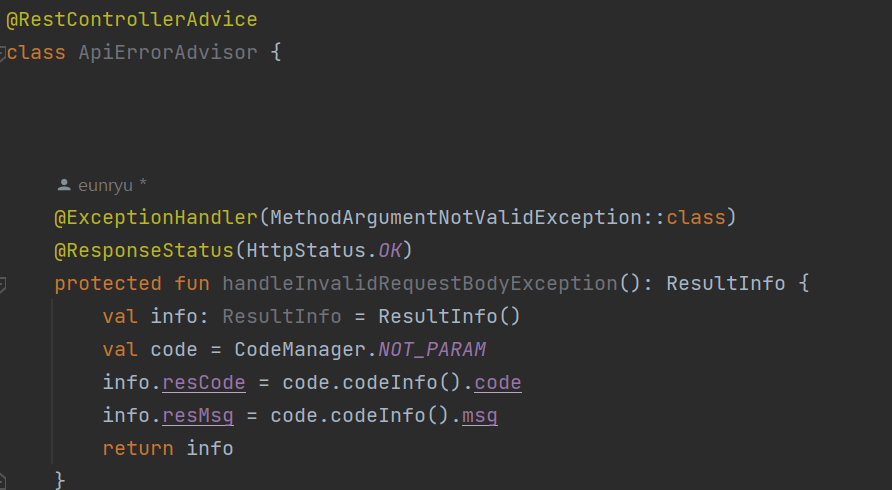
더 자세한 내용은 아래 블로그 참고
Kotlin Spring Boot Bean Validation
코프링(Kotlin Spring Boot)에서 Bean Validation을 이용하여 유효성 검사를 하였습니다.
v3.leedo.me
https://wildeveloperetrain.tistory.com/25
Spring Boot Validation 적용하는 법, @Valid 작동 안되는 이유
* @Valid 어노테이션이 작동이 안 한다면? spring boot 2.3 version 이상부터는 spring-boot-starter-web 의존성 내부에 있던 validation이 사라졌습니다. 때문에 사용하시는 spring boot version이 2.3 이상이라면 validatio
wildeveloperetrain.tistory.com
'spring boot' 카테고리의 다른 글
| 어노테이션을 이용해 메소드 인자로 세션값 바로 받기 @LoginUser (0) | 2023.04.19 |
|---|---|
| springbootTest에서 session 이용하기 (0) | 2023.04.19 |
| the apache tomcat native library could not be found using names [tcnative-2, libtcnative-2, tcnative-1, libtcnative-1] (0) | 2023.02.28 |
| ssh로 서버에 접속해서 jar 파일 배포하기 (0) | 2022.11.15 |
| No primary or default constructor found for interface java.util.List (0) | 2022.11.03 |


